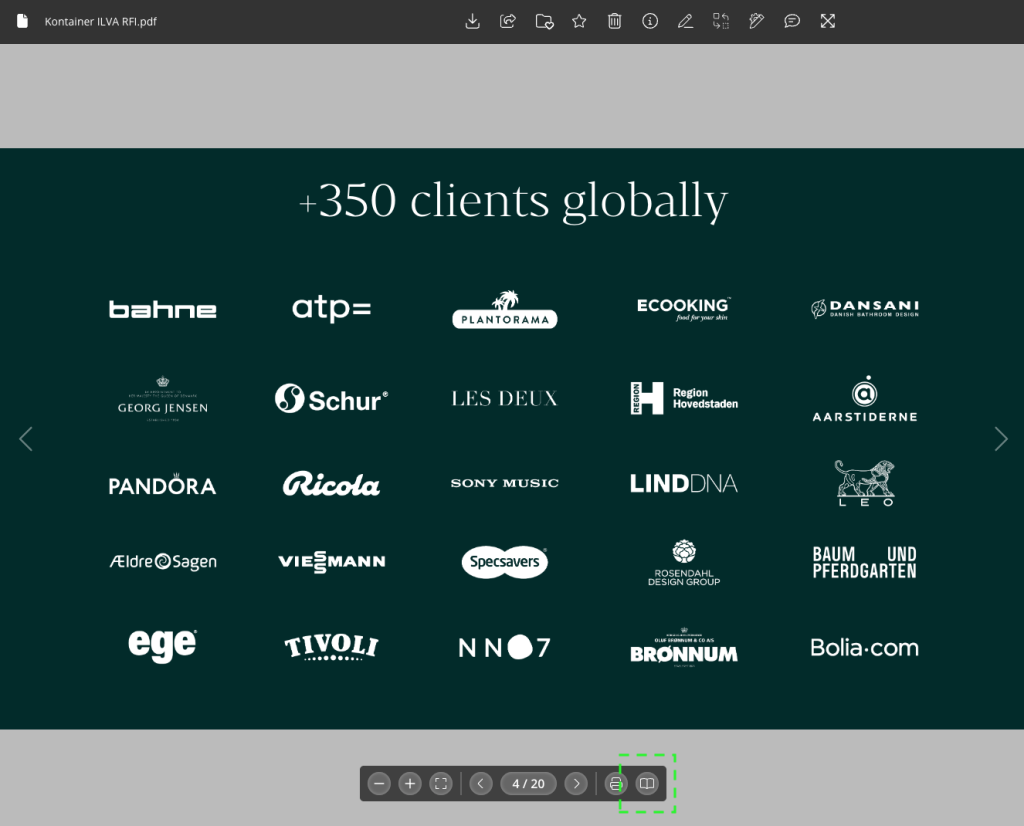
The PDF flipbook viewer shows multi-page PDFs such as catalogues, brochures and presentations as a digital book that you can page through. It works inside Kontainer, and you can also embed it on an external website through a CDN link.
Open a PDF in flipbook mode
Find the PDF in your Kontainer and click it to open the preview.
The PDF opens in the standard preview, which shows one page at a time.
Click the book icon on the right-hand side of the navigation bar at the bottom of the preview.
The PDF switches to flipbook mode, where pages are shown side by side as an open book. Use the arrows to turn the pages.
Navigation bar controls
In flipbook mode, the navigation bar has these controls:
Previous and next turn the pages. The counter between them shows the two pages that are open, for example 4-5 / 20.
Download downloads the PDF.
Book icon switches back to the standard preview.
To zoom in or out in flipbook mode, scroll on the page.
Get the PDF viewer URL
Every PDF has a PDF viewer URL on Kontainer's CDN. You can use it to show the PDF viewer on a website, intranet or landing page. Visitors don't need a Kontainer login to view it.
Open the PDF preview and click the info icon in the top menu.
In the panel on the right, scroll down to CDN and expand the section.
Tick Active if it isn't already ticked.
Find the PDF viewer URL field and click the copy icon next to it to copy the URL.
To see what visitors will see, click Open PDF viewer under the URL field.
The CDN section also has an Embed URL and a Download URL. These point to the PDF file itself, not to the viewer. Use the PDF viewer URL when you want visitors to page through the PDF in the viewer.
You can also get the PDF viewer URL through the Kontainer API. This is useful when your website or another system shows PDFs from Kontainer automatically. Read more in Kontainer API Integration.
Embed the PDF viewer on a website
Paste the PDF viewer URL into your website's embed or iframe block. If you edit the HTML directly, you can use this snippet and replace YOUR-PDF-VIEWER-URL with the URL you copied:
Change the height to suit your page layout. Most CMS platforms, for example WordPress, HubSpot and Drupal, also let you paste the URL straight into an embed block.
Good to know
Views of an embedded PDF viewer count towards your plan's monthly CDN traffic. Read more in Using CDN Links.
If you untick Active in the CDN section, the PDF viewer URL stops working on every site where it is used.